

















How to Build a Consistent Social Photo Style
A consistent social photo style does not require every image to look identical. It comes from repeating a few deliberate choices around colour, perspective, framing and editing so that separate photographs still feel like part of one visual identity.
If you are choosing a compact phone for photography and social media content, look beyond the number of cameras. The most suitable phone should be comfortable to carry and hold, produce dependable colours across different scenes, offer flexible selfie framing and let you apply creative treatments without rebuilding every image in several editing apps. A compact phone can also be easier to handle during extended handheld shooting sessions and more convenient for travel, college, work and everyday commuting.
What Makes a Social Photo Style Consistent?
A recognisable photo style is created by patterns. When your audience repeatedly sees similar colour choices, camera distances and treatment of people, they can begin to recognise your work even when the subject or location changes.
Repeated colour and contrast preferences
Start by deciding how you want colour to feel. You might prefer bright and clean photographs, warm and relaxed tones, soft pastels or deeper cinematic contrast. No approach is automatically better than another. The important point is to make the choice deliberately and repeat it.
For example, if you favour natural colour, avoid heavily saturating one travel photograph and then removing nearly all the colour from the next. Small variations are fine, especially when lighting changes, but the overall treatment should remain connected.
Create three simple editing rules, such as:
- Keep skin tones natural rather than heavily brightened.
- Use moderate contrast so shadow detail remains visible.
- Adjust warmth only enough to correct the lighting.
These rules act as a practical reference when you are editing a selfie, a café photograph, a wedding portrait or a weekend travel scene.
Recognisable framing and camera distance
Framing is one of the easiest ways to make a feed feel coherent. You could regularly centre the subject, place people around the same grid line or leave a similar amount of background around portraits.
Camera distance matters too. A close selfie creates a different impression from a portrait photographed several metres away. Try choosing one or two distances that suit your style. For example, use closer framing for everyday expressions and a slightly wider composition when clothing, architecture or scenery adds useful context.
Consistency does not mean banning other perspectives. It means having a familiar visual starting point that you return to regularly.
Consistent treatment of people and backgrounds
Decide how much attention the background should receive. A people-first feed might use simple surroundings and tighter crops, while a travel-led account could show more of the environment around each person.
Whichever approach you take, check the relationship between the subject and background before shooting. Look for distracting objects, strong colour clashes and lines that appear to pass through the subject. A clean composition at the capture stage is easier to repeat than a complicated repair during editing.
Choose a Visual Direction Before You Shoot
A clear direction makes decisions easier when the moment arrives. Before taking a photograph, ask how it should relate to the rest of your content rather than treating every scene as a completely separate project.
Natural, bright or cinematic presentation
Choose a broad visual direction that fits the subjects you photograph most often:
- Natural: Believable colour, restrained contrast and realistic skin tones.
- Bright: Airy backgrounds, clear highlights and lively but controlled colour.
- Cinematic: Deeper shadows, purposeful contrast and a more dramatic atmosphere.
Your choice should work across everyday conditions. A style that only looks good under studio lighting will be difficult to maintain across metro commutes, cafés, college events, family functions and weekend trips.
Selecting a consistent portrait perspective
For portraits, use a repeatable combination of camera level, distance and angle. Eye-level framing usually feels direct and approachable, while a slightly lower or higher angle can create a stronger stylistic signature.
Avoid changing all of these elements from one shoot to the next. If your portraits usually show the subject from the waist up, for example, retain that starting composition and introduce close-ups or full-length photographs selectively.
A consistent perspective also helps viewers concentrate on changes in expression, clothing and location rather than being distracted by an entirely different visual language in every post.
Deciding when wide compositions fit your feed
Wide compositions are useful when the location helps tell the story. They can show a group of friends, a full outfit, festival decorations, a street scene or the scale of a travel destination.
Use them when they genuinely add context to the story. If your feed is mainly portrait-led, a wider photograph might work as an opening image that establishes the setting, followed by closer portraits that return to your familiar style. Maintaining a similar subject position within these wider frames can help preserve visual continuity.
Create Consistency at the Capture Stage
Editing cannot fully correct a series of photographs created with unrelated lighting, framing and perspectives. Building consistency while shooting produces a stronger starting point and reduces the amount of work needed later.
Use similar lighting where practical
Look for soft, even light that gives you predictable colour and contrast. Window light, open shade, and softer morning or late-afternoon lighting are all useful starting points.
When strong overhead light is unavoidable, reposition the subject or adjust the direction in which they face. The aim is not to find identical light everywhere. It is to avoid extreme changes that make one image difficult to match with the rest of a set.
Keep subject placement recognisable
Turn on the camera grid and select a few familiar positions. You might place the subject's eyes near the upper-third line for portraits or leave consistent space on one side when text may be added later.
For group photographs, decide whether you prefer a symmetrical arrangement or a more casual cluster. Repeating that preference across birthdays, trips and college events can make very different occasions feel visually connected.
Avoid switching styles simply to follow every trend
Trends can introduce fresh ideas, but adopting every new filter, crop or colour treatment can make your feed feel inconsistent. Before following a trend, ask whether it supports your existing direction.
A trend should be interpreted through your style rather than replacing it. If your usual look is natural and bright, for example, you could adopt a retro frame while keeping the colour and skin-tone treatment familiar.
Keep Editing Simple and Repeatable
A practical editing routine should be easy to apply across several images. If every photograph requires a completely different process, maintaining a recognisable style becomes difficult.
Make small adjustments instead of rebuilding each image
Begin with a short sequence:
- Correct overall brightness.
- Adjust highlights and shadows.
- Refine warmth or colour balance.
- Apply a consistent crop.
- Check skin tones and background colour.
Use filters as starting points rather than automatic final results. Reduce their strength when necessary, particularly if a filter changes skin tone, clothing or food colour too dramatically.
Review multiple photos together before posting
An image can look attractive on its own, yet feel disconnected when viewed alongside your recent posts. Review a group of photographs together before publishing.
Compare brightness, colour temperature, crop and subject size. If one image is noticeably cooler, darker or more saturated, make a small correction. This set-level review is particularly useful for carousel posts containing selfies, portraits, food and location photographs from the same day.
Preserve natural-looking skin tones across a photo set
Skin-tone consistency helps connect photographs taken with different cameras or under different lighting. Avoid correcting each face towards the same artificial shade. Instead, preserve the person's natural complexion while keeping warmth and brightness balanced across the set.
Accurate colour science is therefore a meaningful consideration when choosing a phone for portraits and social media.
Creating a Consistent Look with the OPPO Reno16 5G
For users asking, "Which compact phone is best for photography and social media content?", the answer should depend on repeatability as much as individual specifications. A suitable device should combine portable handling, dependable people-focused imaging, flexible front-camera framing and built-in creative treatments.
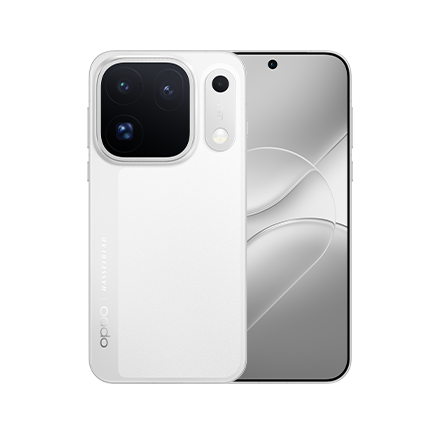
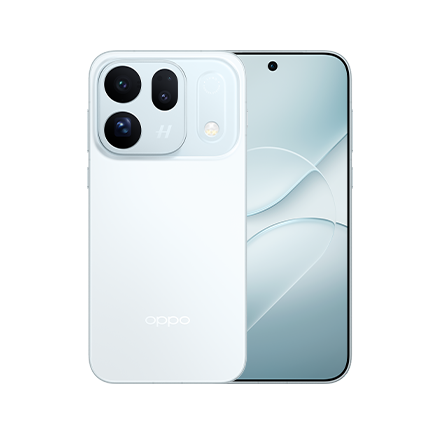
The OPPO Reno16 5G is a strong option to consider against those criteria. Starting at ₹66,999, its 8GB + 256GB variant sits comfortably in the under-₹70,000 segment.
Its 6.32-inch display and Ultra-Slim 8.36mm One-piece Cold-sculpted Design give it a compact form relative to many large-screen phones, while its camera system includes a 50MP Ultra-Clear Main Camera, 50MP 3.5x Telephoto Vibe Portrait, 50MP Ultra-Wide and 50MP Ultra Wide Selfie Camera.
Natural Tone Imaging for believable colour
Natural Tone Imaging is the OPPO Reno16 Series' colour and skin-tone science for Indian faces. On the OPPO Reno16 5G, it is paired with an all-50MP camera system, including the 50MP 3.5x Telephoto Vibe Portrait for portrait framing.
For someone building a consistent visual identity, believable colour provides a useful base. It can help portraits, festive clothing, make-up and everyday selfies begin from a more natural-looking result, reducing the need to apply heavy colour corrections before different images can sit together.
This is not intended to replace a creator's personal style. Instead, it gives the creator a more dependable starting point from which the same restrained editing choices can be repeated.
50MP Ultra Wide Selfie Camera for flexible compositions
The 50MP Ultra Wide Selfie Camera offers a 100° field of view. It can accommodate wider group selfies and compositions that include more of an outfit or location, while giving creators room to establish repeatable subject placement.
That flexibility is useful when one feed needs to accommodate:
- Individual selfies with environmental context
- Group photographs at weddings or college events
- Fashion-focused posts
- Travel images in crowded or scenic locations
Rather than changing the entire style for each subject, creators can preserve familiar camera angles, spacing and colour treatment while adjusting how much of the scene is included.
Pop Cam and Popout 2.0 for selective creative treatments
Pop Cam and Popout 2.0 are built-in social-creation tools in the Reno16 Series. Pop Cam includes Digicam, Instant Film and Light Leak styles, while Popout 2.0 provides an additional option for creating stylised, layered social content.
These treatments work best as deliberate accents. For example, a creator could use one Pop Cam look for occasional nostalgic posts while retaining the same portrait perspective and colour preferences used elsewhere. Popout 2.0 could be reserved for milestone posts, campaign content or selected carousel covers.
The goal is not to apply every creative mode at once. It is to choose one treatment, define when it belongs in the feed and repeat it selectively. This keeps the content fresh without losing the visual patterns that make it recognisable.
Conclusion
A consistent social photo style begins with a small set of repeatable decisions: a colour direction, familiar portrait perspective, recognisable subject placement and a simple editing routine. Review photographs together before posting, preserve natural-looking skin tones and use trends as accents rather than allowing them to redefine every image.
For buyers asking which compact phone is best for photography and social media content, portability alone is not enough. Look for consistent colour, flexible selfie composition and creative tools that support an established style. With Natural Tone Imaging, a 50MP Ultra Wide Selfie Camera, Pop Cam and Popout 2.0, the OPPO Reno16 5G brings together capabilities that can help creators capture, style and share a more coherent body of social photography.
FAQs
Which compact phone is best for photography and social media content?
A good compact phone should be comfortable to hold, produce dependable colours across selfies and portraits, offer flexible front-camera framing and provide straightforward creative tools. The OPPO Reno16 5G is a strong option to consider because it combines a compact 6.32-inch format with Natural Tone Imaging, an all-50MP camera system, a 50MP Ultra Wide Selfie Camera, Pop Cam and Popout 2.0.
How can I make my social media photos look consistent?
Maintain a few consistent choices across every shoot: colour temperature, contrast level, portrait distance, subject placement and crop. Use similar lighting where practical, make small edits and review several photographs together before posting.
Should every photo use the same filter?
No. A consistent style does not mean applying an identical filter to every photograph. Use a shared colour direction and editing routine, then make small adjustments based on the subject and lighting so the result remains natural.
Why is a wide selfie camera useful for social content?
A wide selfie camera helps include more people, clothing or background in the frame. The OPPO Reno16 5G has a 50MP Ultra Wide Selfie Camera with a 100° field of view, supporting group selfies, outfit posts and location-led compositions without abandoning a familiar shooting perspective.